Interviews are more than just a Q&A session—they’re a chance to prove your worth. This blog dives into essential Use of Technology for Education interview questions and expert tips to help you align your answers with what hiring managers are looking for. Start preparing to shine!
Questions Asked in Use of Technology for Education Interview
Q 1. Describe your experience with various Learning Management Systems (LMS) such as Moodle, Canvas, Blackboard.
My experience with Learning Management Systems (LMS) is extensive, encompassing Moodle, Canvas, and Blackboard. I’ve used them in various capacities – as a student, instructor, and administrator. Each platform offers unique strengths. Moodle, known for its flexibility and open-source nature, allows for significant customization but can have a steeper learning curve for beginners. I’ve used it to create complex course structures with integrated forums, quizzes, and assignment submissions. Canvas boasts a user-friendly interface, particularly appealing for students and instructors new to online learning. I’ve found its gradebook and communication tools particularly efficient. Blackboard, while perhaps less visually appealing than Canvas, offers robust features for large-scale deployments and has excellent support for institution-wide integration. In my experience, the most effective LMS is the one best suited to the specific needs of the institution and its learners. For example, in a smaller, more specialized setting, Moodle’s customization might be ideal. In a larger university environment, Blackboard’s scalability and support infrastructure might be preferable. I’m comfortable adapting my approach to effectively utilize any of these platforms.
Q 2. Explain your understanding of different pedagogical approaches and how technology can support them.
My understanding of pedagogical approaches is grounded in the belief that technology should enhance, not replace, effective teaching methodologies. I’m familiar with constructivist, connectivist, and behaviorist approaches, and I believe technology can significantly support each. For example, a constructivist approach, which emphasizes learner-centered discovery, can be supported by using interactive simulations, collaborative projects using tools like Google Docs, and multimedia resources that encourage exploration and critical thinking. Connectivism, which focuses on the connections between learners and information, benefits from technology through the use of social media platforms for educational discussions, online communities, and curated content aggregators. Behaviorist approaches, focusing on reinforcement and feedback, are effectively supported by using technology to provide immediate feedback on assessments, gamified learning experiences, and personalized learning paths using adaptive learning platforms.
For instance, in a science class, I might use a virtual lab simulation to allow students to safely experiment and learn from their mistakes, aligning with a constructivist approach. In a history class, a social media group dedicated to collaborative research and discussion would support a connectivist approach. In a language class, spaced repetition software could reinforce vocabulary acquisition, supporting a behaviorist approach. The key is to strategically integrate technology to enhance the chosen pedagogy, ensuring that the technology serves the learning objectives rather than dictating them.
Q 3. How would you assess the effectiveness of technology integration in a classroom setting?
Assessing the effectiveness of technology integration requires a multifaceted approach. It’s not enough simply to introduce technology; we need to measure its impact on student learning outcomes. I would use a combination of quantitative and qualitative methods. Quantitative measures might include pre- and post-tests to assess learning gains, analyzing student performance data within the LMS, and tracking engagement metrics such as time spent on activities and participation in online discussions. Qualitative methods would involve gathering student feedback through surveys, focus groups, or interviews to understand their perceptions of the technology’s impact on their learning experience. Observational data from the classroom, noting how students are using the technology and interacting with each other, provides additional valuable insights.
For example, if I introduced a new interactive simulation in a science class, I’d compare student test scores before and after its implementation. I’d also conduct student interviews to understand how helpful they found the simulation and whether it enhanced their understanding of the concepts. By combining quantitative and qualitative data, I can create a comprehensive picture of the technology’s effectiveness and identify areas for improvement.
Q 4. What are some common challenges in integrating technology into education, and how would you address them?
Common challenges in integrating technology in education include:
- Lack of access and digital divide: Not all students have equal access to technology or reliable internet connectivity. Addressing this requires advocating for equitable resource distribution and exploring offline learning options.
- Teacher training and support: Effective technology integration requires adequate training and ongoing support for teachers. This involves providing professional development opportunities and access to technical assistance.
- Integration with curriculum: Simply introducing technology is not enough. It needs to be thoughtfully integrated into the curriculum to support learning objectives. This requires careful planning and alignment.
- Maintaining student engagement: Technology can be distracting if not used purposefully. Maintaining student engagement requires thoughtful lesson design and activities that actively involve students.
- Data privacy and security concerns: Protecting student data is paramount. Adopting secure practices and being aware of relevant data privacy regulations is crucial.
Addressing these challenges involves a collaborative effort among educators, administrators, and technology specialists. This includes providing equitable access to technology, investing in teacher training and ongoing support, thoughtfully integrating technology into the curriculum, designing engaging activities, and prioritizing data security.
Q 5. Discuss your experience with developing or implementing online learning courses.
I have extensive experience in developing and implementing online learning courses. I have designed courses using a variety of LMS platforms, including Moodle, Canvas, and Blackboard, incorporating different media types, such as videos, interactive simulations, and collaborative projects. I have developed courses in both asynchronous and synchronous formats, catering to diverse learning styles and preferences. My approach emphasizes clear learning objectives, engaging content, regular feedback mechanisms, and opportunities for interaction among learners. For example, in a recent course development project, I created a blended learning environment combining online modules with in-person workshops. This hybrid approach addressed the needs of students who preferred self-paced learning while also incorporating opportunities for collaborative learning and face-to-face interaction.
A critical aspect of my approach is iterative development. I continuously evaluate the effectiveness of my courses through student feedback, performance data, and assessment results. This iterative approach ensures that my courses are engaging and effective, constantly adapting based on evidence and student needs. For instance, I regularly review student progress and adjust the pacing or content of the course accordingly to maximize learning outcomes.
Q 6. How familiar are you with accessibility guidelines for educational technology (e.g., WCAG)?
I am very familiar with accessibility guidelines for educational technology, particularly the Web Content Accessibility Guidelines (WCAG). I understand the importance of creating inclusive learning environments that are accessible to all learners, regardless of their abilities. This includes ensuring that course materials and online learning environments conform to WCAG standards, which cover a wide range of accessibility considerations including visual, auditory, motor, and cognitive impairments. My experience includes incorporating alternative text for images, using closed captions for videos, providing transcripts for audio content, and ensuring sufficient color contrast for readability. I am proficient in using assistive technologies and understand how to create accessible content using various authoring tools. In my course development work, I prioritize accessibility from the design phase, ensuring that accessibility is not an afterthought but a central consideration.
Q 7. Describe your experience using data analytics to improve learning outcomes.
My experience using data analytics to improve learning outcomes focuses on leveraging data to understand student performance, identify areas of struggle, and personalize learning experiences. I use LMS data, including student grades, assignment submissions, quiz scores, and engagement metrics to inform my instructional decisions. For instance, if I observe a high failure rate on a specific module, I can use this data to revise the content, provide additional support resources, or adjust the teaching strategies for that module. Analyzing student participation in online discussions and forums provides insights into learner engagement and allows me to tailor activities and interactions to better support students’ needs. By analyzing patterns in student data, I can identify common challenges and design targeted interventions. Furthermore, I use learning analytics tools to personalize learning pathways for individual students based on their strengths and weaknesses. This approach ensures that all learners receive the support they need to succeed.
For example, using the data from an LMS, I might discover that a significant number of students are struggling with a particular concept in a math course. This data would inform the creation of supplemental learning materials, such as videos or practice problems, targeted at addressing that specific concept. This data-driven approach allows for continuous improvement of teaching and learning practices, resulting in better learning outcomes for all students.
Q 8. How would you evaluate the effectiveness of an educational app or software?
Evaluating the effectiveness of an educational app or software requires a multifaceted approach that goes beyond simple user reviews. We need to consider learning outcomes, engagement metrics, and user experience.
- Learning Outcomes: The most crucial aspect is whether the app helps students achieve specific learning goals. This involves pre- and post-tests, analyzing student performance data within the app (e.g., completion rates, accuracy on assessments), and comparing their performance to control groups (if applicable).
- Engagement Metrics: We look at how much time students spend using the app, their frequency of use, and their interaction with different features. High engagement doesn’t always equate to effective learning, but low engagement is a red flag. Tools like analytics dashboards built into the app or external tracking systems can provide this data.
- User Experience (UX): Is the app intuitive and easy to navigate? Does it provide sufficient feedback to students? User testing with focus groups or individual interviews can reveal usability issues and areas for improvement. We’d also analyze user reviews and feedback for insights.
- Accessibility: Ensuring the app is accessible to all learners, including those with disabilities, is crucial. This involves assessing compliance with accessibility guidelines like WCAG.
For example, if evaluating a math app, we might compare the test scores of students who used the app with those who learned through traditional methods. We’d also analyze how frequently students use different features within the app to see if they are effectively utilizing its learning components.
Q 9. What are some best practices for designing engaging and effective online learning experiences?
Designing engaging and effective online learning experiences involves understanding adult learning principles and leveraging technology’s strengths.
- Clear Learning Objectives: Start with well-defined learning goals. Students need to understand what they will achieve by the end of the course or module.
- Interactive Content: Avoid passive learning. Incorporate activities like quizzes, simulations, discussions, and collaborative projects. Think beyond simple multiple-choice questions; use interactive simulations or case studies.
- Personalized Learning: Cater to different learning styles and paces. Adaptive learning platforms can personalize the learning path based on individual student performance.
- Multimedia Integration: Use a mix of text, images, audio, and video to cater to different learning preferences and make content more engaging. But remember the KISS principle (Keep It Simple, Stupid) – avoid overwhelming learners with too much multimedia.
- Regular Feedback and Assessment: Provide timely feedback on student progress and incorporate formative assessments to gauge understanding throughout the learning process, not just at the end. Think of feedback as an ongoing conversation, not just a final grade.
- Community Building: Foster interaction and collaboration among learners through discussion forums, group projects, or virtual study groups. Creating a sense of community enhances motivation and engagement.
- Accessibility: Ensure the learning experience is accessible to all learners, regardless of their abilities or technological resources.
For instance, instead of a lengthy lecture on photosynthesis, use an interactive simulation where students can manipulate variables to see how they affect the process. Or, for history, create a virtual field trip to a historical site.
Q 10. Explain your understanding of different types of educational technologies (e.g., simulations, gamification, AR/VR).
Educational technologies encompass a wide range of tools and approaches, each with its unique strengths:
- Simulations: These provide virtual environments that allow students to experience real-world scenarios without the risks or costs associated with real-world application. Examples include flight simulators for pilots or chemistry simulations that allow students to experiment with different chemicals safely. They are excellent for learning through experience.
- Gamification: This involves incorporating game design elements like points, badges, leaderboards, and challenges into educational activities to increase motivation and engagement. A simple example would be awarding points for completing assignments or answering questions correctly.
- Augmented Reality (AR): AR overlays digital information onto the real world, enriching the learning experience. Imagine a student using an AR app to view a 3D model of a human heart superimposed over a textbook diagram. It makes abstract concepts more tangible.
- Virtual Reality (VR): VR immerses students in completely digital environments, creating realistic and engaging learning experiences. This could range from exploring ancient Rome in a virtual reconstruction to practicing surgical techniques in a simulated operating room.
- Learning Management Systems (LMS): Platforms like Moodle, Canvas, and Blackboard provide a centralized space for course materials, communication, and assessment.
The choice of technology depends on the learning objectives, subject matter, and student needs. For instance, a history class might benefit from VR field trips, while a science class could use simulations to explore complex concepts.
Q 11. Describe your experience with creating multimedia learning materials.
I have extensive experience creating multimedia learning materials, utilizing various tools and techniques. My approach centers on clarity, engagement, and accessibility.
- Storyboarding: Before production, I meticulously storyboard the content, outlining the flow of information and the types of media to be used (images, videos, audio, animations).
- Software Proficiency: I am proficient in various software applications, including Adobe Creative Suite (Photoshop, Illustrator, After Effects, Premiere Pro), video editing software, and audio editing software. This allows me to create visually appealing and engaging content.
- Accessibility Considerations: From the outset, I incorporate accessibility features like closed captions for videos, alt text for images, and keyboard navigation for interactive elements.
- Content Chunking: I break down complex information into smaller, digestible chunks to prevent cognitive overload and enhance learning retention. This is especially important in online learning environments.
- Assessment Integration: I often embed interactive quizzes or assessments within the multimedia materials to gauge student understanding and provide immediate feedback.
For example, when creating a module on the human circulatory system, I might incorporate a 3D animation of blood flow, interactive diagrams that allow students to label different parts of the heart, and short video clips explaining complex concepts. I’d always ensure alt text describes the animations for visually impaired learners.
Q 12. How would you train teachers on effectively using educational technology?
Training teachers on educational technology requires a blended approach combining theoretical understanding with practical application. It’s not simply about showing them *how* to use software; it’s about helping them integrate it effectively into their teaching practices.
- Needs Assessment: Begin with assessing teachers’ current tech skills and their specific needs. This could involve surveys, interviews, or observations.
- Phased Training: Introduce technology gradually, starting with basic functionalities before moving to more advanced features. Avoid overwhelming them with too much information at once.
- Hands-on Workshops: Provide opportunities for teachers to practice using the technology in a supportive environment. Workshops should include opportunities for peer learning and collaboration.
- Modeling Effective Use: Demonstrate how the technology can be integrated into lesson plans to address specific learning objectives. Show, don’t just tell.
- Ongoing Support and Mentorship: Offer ongoing support through online forums, email, or one-on-one consultations. Assign mentor teachers who can assist colleagues.
- Professional Development Opportunities: Encourage teachers to participate in conferences, workshops, or online courses related to educational technology.
For example, if introducing a new LMS, start with a workshop focusing on basic navigation and uploading content, followed by sessions on using the assessment features and integrating interactive activities.
Q 13. What are your strategies for providing technical support to educators and students?
Providing technical support to educators and students requires a proactive and responsive approach.
- Multiple Support Channels: Offer support through various channels like email, phone, online help desk, FAQs, and tutorials. Consider live chat support during peak usage times.
- User-Friendly Documentation: Create comprehensive documentation, including tutorials and troubleshooting guides. Use clear, concise language and visuals.
- Proactive Monitoring: Monitor system performance and address potential issues before they affect users. This includes regular system maintenance and updates.
- Tiered Support: Implement a tiered support system where simple issues are handled through self-service resources, while more complex issues are addressed by trained technicians.
- Personalized Assistance: When providing assistance, take a personalized approach, understanding the user’s level of technical expertise and tailoring the support accordingly.
- Feedback Mechanism: Establish a system for gathering user feedback to identify areas for improvement in the support process and the technology itself.
For example, if a teacher is having trouble uploading a video to the LMS, we might provide a step-by-step guide via email, or if the issue persists, offer a live screen-sharing session to troubleshoot the problem.
Q 14. How would you address concerns about digital equity and access to technology?
Addressing digital equity and access to technology is paramount for ensuring equitable educational opportunities. It requires a multi-pronged strategy:
- Device Provision: Schools and districts need to ensure all students have access to reliable devices (laptops, tablets) and internet connectivity, particularly for those from low-income families. This may involve partnerships with community organizations or government initiatives.
- Digital Literacy Training: Provide digital literacy training to both students and families, focusing on basic computer skills, internet safety, and responsible technology use.
- Equitable Software and Resources: Ensure all students have access to the necessary software and online resources, regardless of their socioeconomic background. Consider open-source options and free online resources.
- Hybrid Learning Models: Implement hybrid learning models that combine online and offline learning activities, allowing students to participate even if they have limited or intermittent internet access.
- Community Engagement: Partner with community organizations, libraries, and other institutions to provide access to technology and internet connectivity outside of school hours.
- Advocacy: Advocate for policies and funding that support digital equity at the local, state, and national levels.
For example, a school might establish a computer lab with free internet access for students who lack internet at home, or they might offer after-school workshops to teach digital literacy skills to parents and students. Addressing digital equity is a continuous process that requires sustained commitment and collaboration.
Q 15. Describe your experience with project management in educational technology initiatives.
My experience in project management within educational technology involves a multifaceted approach, encompassing strategic planning, resource allocation, risk mitigation, and effective team leadership. I’ve successfully led numerous initiatives, from the implementation of new learning management systems (LMS) to the design and deployment of interactive digital learning resources. For example, in one project, I managed the transition of a large school district to a new LMS, ensuring seamless data migration, comprehensive teacher training, and ongoing technical support. This involved meticulous planning – defining clear project goals, establishing timelines, and assigning roles and responsibilities to a diverse team of educators, IT specialists, and administrators. Regular progress meetings, coupled with proactive risk management (e.g., addressing potential technical glitches or resistance to change), were crucial to the project’s success. The final outcome was a smooth transition with high user satisfaction and improved teaching and learning outcomes.
In another instance, I spearheaded the development of a personalized learning platform using adaptive learning technologies. Here, agile project management methodologies were key, allowing for iterative development and incorporating feedback from educators and students throughout the process. This flexible approach ensured the final product met the specific needs of the learners and aligned with the educational goals of the institution.
Career Expert Tips:
- Ace those interviews! Prepare effectively by reviewing the Top 50 Most Common Interview Questions on ResumeGemini.
- Navigate your job search with confidence! Explore a wide range of Career Tips on ResumeGemini. Learn about common challenges and recommendations to overcome them.
- Craft the perfect resume! Master the Art of Resume Writing with ResumeGemini’s guide. Showcase your unique qualifications and achievements effectively.
- Don’t miss out on holiday savings! Build your dream resume with ResumeGemini’s ATS optimized templates.
Q 16. How do you stay current with the latest trends and developments in educational technology?
Staying current in the ever-evolving field of educational technology requires a multi-pronged approach. I actively participate in professional learning communities (PLCs) both online and in-person, engaging in discussions and sharing best practices with other educators and technology specialists. I subscribe to relevant journals and newsletters, such as those published by ISTE (International Society for Technology in Education) and Educause. I regularly attend conferences and workshops focusing on emerging technologies and pedagogical innovations in education. Moreover, I leverage online resources such as educational technology blogs, podcasts, and webinars to access cutting-edge research and insights. Finally, I dedicate time to exploring and experimenting with new technologies myself, ensuring I have hands-on experience with the tools and platforms I recommend to educators. This hands-on approach, combined with a strong theoretical foundation, allows me to effectively evaluate and integrate new technologies into educational settings.
Q 17. Explain your understanding of blended learning models and their implementation.
Blended learning models seamlessly integrate online and face-to-face instruction, offering a flexible and personalized learning experience. These models vary widely in their approach, but they all aim to leverage the strengths of both online and offline environments. For example, a ‘rotation model’ might involve students rotating between online learning modules and classroom-based activities. A ‘flex model’ allows students to choose the learning modality that best suits their needs and learning style, while a ‘enriched virtual model’ enhances traditional face-to-face instruction with online resources and activities.
Successful implementation requires careful planning. This involves identifying clear learning objectives, selecting appropriate online tools and resources, designing engaging learning activities both online and offline, providing adequate teacher training and technical support, and establishing a robust assessment strategy that captures student learning across both modalities. For instance, when implementing a blended learning model in a high school history class, I might use online simulations for engaging students with historical events, while reserving classroom time for in-depth discussions and collaborative projects. This balanced approach fosters deeper learning and caters to diverse learning styles.
Q 18. How would you develop a professional development program for educators on integrating a specific technology?
Developing a professional development program for educators on integrating a specific technology, say, for example, interactive whiteboard software, requires a structured and engaging approach. The program should begin with a needs assessment to determine the educators’ current level of technological proficiency and their specific needs. The training itself should be modular, catering to different learning styles and paces. This might include online modules, hands-on workshops, and coaching sessions.
The program should focus on both the technical aspects of the software and its pedagogical applications. Educators need to understand how to use the software effectively and how to integrate it into their teaching practices to enhance learning outcomes. Modeling effective use cases, providing opportunities for collaborative practice, and embedding ongoing support mechanisms such as peer mentoring or access to online forums are crucial. Finally, the effectiveness of the program should be assessed through pre- and post-training evaluations, measuring both educators’ technical skills and their confidence in using the technology to improve teaching and student learning.
Q 19. What are your preferred methods for assessing student learning in online or blended learning environments?
Assessing student learning in online or blended learning environments requires a multifaceted approach that goes beyond traditional paper-and-pencil tests. A variety of assessment methods should be employed to gain a comprehensive understanding of student learning. These include:
- Formative assessments: These ongoing assessments, such as quizzes, discussions, and in-class activities, provide feedback to both students and teachers, allowing for adjustments to instruction as needed.
- Summative assessments: These end-of-module or end-of-course assessments, such as projects, presentations, and exams, evaluate overall student learning.
- Authentic assessments: These real-world tasks, such as simulations, case studies, or portfolio development, assess students’ ability to apply their knowledge and skills in meaningful contexts.
- Self and peer assessments: These methods encourage students to reflect on their own learning and provide feedback to their peers, promoting metacognition and collaboration.
Using a variety of assessment methods ensures a more holistic understanding of student learning and allows for a more accurate evaluation of their progress. For instance, in an online course, I might use short quizzes to check for understanding of concepts, a final project to assess application of knowledge, and online discussions to evaluate communication skills.
Q 20. Describe your experience with using educational technology to support students with diverse learning needs.
Educational technology plays a vital role in supporting students with diverse learning needs. For students with disabilities, assistive technologies, such as text-to-speech software, screen readers, and adaptive learning platforms, can significantly enhance their learning experience. For students with learning differences, such as ADHD or dyslexia, technology can provide customized learning experiences, allowing them to learn at their own pace and in ways that cater to their specific needs. For example, I’ve worked with students who benefit greatly from using speech-to-text software to complete written assignments, or those who use interactive simulations to better understand complex scientific concepts.
Moreover, technology can facilitate differentiated instruction by allowing teachers to create personalized learning pathways for each student. Adaptive learning platforms can provide customized feedback and support, adjusting the difficulty level of the content based on each student’s performance. Universal Design for Learning (UDL) principles, which focus on creating flexible learning environments that cater to diverse learners, can be effectively implemented using various technological tools.
Q 21. How would you design an effective online assessment strategy?
Designing an effective online assessment strategy requires careful consideration of several factors. Firstly, the assessment should align with the learning objectives of the course, ensuring it accurately measures student understanding of the key concepts. Secondly, the assessment should be accessible to all students, regardless of their learning needs or technological capabilities. This means using a variety of assessment formats, such as multiple-choice questions, essay questions, and interactive simulations, and ensuring that the assessment platform is compatible with assistive technologies. Thirdly, the assessment should be secure to prevent cheating and ensure the validity of the results. This often involves using plagiarism detection software and employing strategies to limit opportunities for academic dishonesty.
Furthermore, the assessment should provide timely and constructive feedback to students. This feedback should help students understand their strengths and weaknesses and identify areas where they need to improve. Finally, the assessment results should be used to inform teaching and learning, allowing educators to adjust their instruction based on student performance. For instance, using an LMS with built-in assessment features, coupled with automated feedback mechanisms and plagiarism checks, would provide a robust and efficient assessment system.
Q 22. Explain your understanding of different types of educational data and how to analyze them.
Educational data encompasses a wide range of information gathered to understand student learning and improve teaching strategies. Analyzing this data effectively is crucial for enhancing educational outcomes. We can categorize educational data into several types:
- Learning Analytics: This involves tracking student performance on assessments, assignments, and online activities. Examples include grades, time spent on tasks, and frequency of logins. Analyzing this data can reveal patterns in student learning, identify struggling students early, and inform instructional adjustments.
- Student Demographic Data: This includes information like age, gender, socioeconomic background, and learning styles. Analyzing this data helps tailor instruction to meet diverse needs and address equity gaps. For instance, recognizing a higher failure rate among students from low-income backgrounds might indicate a need for targeted support programs.
- Classroom Observation Data: This qualitative data captures teacher-student interactions, classroom dynamics, and teaching practices. Analyzing this data (often through qualitative methods like thematic analysis) provides insights into effective teaching strategies and areas for improvement. For example, noting recurring disruptions during a particular lesson might suggest a need for a more engaging teaching method.
- Teacher Feedback Data: This includes teachers’ self-reflections on their teaching practices and their perceptions of student learning. Analyzing this data can inform professional development and improve teaching effectiveness. For example, a teacher might realize a need to incorporate more interactive activities based on self-reflection and student feedback.
Analyzing educational data requires a multi-faceted approach. This often involves using statistical methods (like descriptive statistics, correlations, and regression analysis) for quantitative data, and qualitative methods (like thematic analysis and grounded theory) for qualitative data. Data visualization tools are also extremely important for making patterns and trends easily understandable. It’s crucial to remember that ethical considerations, such as data privacy and informed consent, must be paramount throughout the entire process.
Q 23. What experience do you have with creating or customizing educational content using authoring tools?
I have extensive experience creating and customizing educational content using various authoring tools. My expertise spans several platforms, including Articulate Storyline, Adobe Captivate, and Moodle. I’ve developed interactive e-learning modules, engaging simulations, and assessments for diverse learning objectives. For example, I once developed an interactive simulation using Articulate Storyline for a medical school, allowing students to practice diagnosing patients based on symptoms and test results. This was far more engaging and effective than a traditional lecture. I’m proficient in incorporating multimedia elements such as videos, audio, and interactive exercises to enhance learner engagement. Furthermore, I can adapt existing content to meet specific learning needs, ensuring accessibility and catering to different learning styles.
My approach to content creation emphasizes user-centered design principles. Before starting any project, I conduct thorough needs analysis to determine learning objectives and target audience needs. I always test and iterate the content to ensure effectiveness and improve user experience. I firmly believe in the importance of providing clear, concise, and engaging content that actively involves the learner.
Q 24. Describe your experience with integrating social media or collaborative tools into educational settings.
Integrating social media and collaborative tools into educational settings can significantly enhance student engagement and learning outcomes. In my experience, I’ve successfully used platforms like Google Classroom, Microsoft Teams, and various social media tools (with appropriate moderation and guidelines) to foster collaborative learning environments. For instance, I’ve facilitated online discussions using discussion forums within learning management systems, encouraging students to share ideas, ask questions, and learn from each other. This promotes peer-to-peer learning and builds a sense of community within the classroom.
I’ve also utilized social media platforms (like Twitter or dedicated educational platforms) to share relevant resources, announce assignments, and encourage wider discussions around course materials. This, of course, requires careful consideration of appropriate digital citizenship protocols and establishing clear guidelines for online interactions. The key to successful implementation lies in creating a safe and supportive online environment that encourages respectful communication and collaboration. I always emphasize responsible online behavior and media literacy to ensure students are digitally informed and aware of the potential risks and rewards.
Q 25. How would you troubleshoot technical issues that arise during online learning sessions?
Troubleshooting technical issues during online learning sessions is a critical aspect of effective online instruction. My approach involves a systematic process. First, I gather information from the student(s) experiencing the issue to understand the nature and scope of the problem. This includes identifying the specific error message, the device being used, the internet connection strength, and the steps already taken by the student. Then, I follow a structured troubleshooting process:
- Check the basics: I start by confirming the student has a stable internet connection, the correct software and plugins installed, and their device is functioning correctly. Simple solutions often resolve the majority of problems.
- Remote access and assistance: I utilize tools allowing for remote access to the student’s device to diagnose and solve issues directly, provided appropriate permissions are granted. This includes demonstrating proper procedures and explaining settings to the student.
- Escalation: If the issue is beyond my immediate technical expertise, I escalate the problem to the appropriate IT support personnel.
- Proactive measures: I emphasize preventive maintenance, such as scheduling regular technology checks, providing clear instructions and tutorials to students, and regularly updating software and hardware. This is crucial in minimizing disruptions and ensuring the smooth running of online sessions.
Throughout the process, maintaining clear communication with the students is crucial. Keeping them informed about the troubleshooting steps and estimated resolution time helps minimize frustration and maintain engagement.
Q 26. What are your strategies for promoting digital citizenship and responsible technology use among students?
Promoting digital citizenship and responsible technology use is paramount in any educational setting. My strategies encompass a multi-faceted approach:
- Explicit instruction: I dedicate specific class time to teaching digital citizenship concepts, including online safety, responsible social media use, intellectual property rights, and cyberbullying prevention. This instruction uses relevant, age-appropriate examples and case studies.
- Modeling good behavior: I demonstrate responsible online behavior in my interactions with students, colleagues, and online communities. This is a powerful way to set the expectation for appropriate conduct.
- Interactive activities and discussions: I engage students in discussions and activities about online ethics, encouraging critical thinking and problem-solving skills in relation to digital scenarios.
- Collaboration with parents/guardians: I actively involve parents in the digital citizenship education process by providing resources and fostering open communication about online safety and responsible technology use.
- Development of a digital citizenship policy: This policy establishes clear expectations and consequences for inappropriate online behavior. This creates a framework for students to understand acceptable conduct in the digital realm.
I believe that creating a culture of digital responsibility requires a continuous and evolving effort. It’s an ongoing dialogue and learning experience for both students and educators.
Q 27. How would you create a learning environment that promotes student engagement and collaboration using technology?
Creating a technology-enhanced learning environment that promotes student engagement and collaboration requires careful planning and implementation. My approach focuses on several key strategies:
- Interactive learning activities: I incorporate interactive tools and activities, such as simulations, games, and collaborative projects using platforms like Google Docs or Padlet. These activities stimulate active learning and make the learning process more enjoyable.
- Blended learning approaches: I strategically integrate online and offline learning activities, taking advantage of the strengths of both modes. This might involve online discussions followed by in-class debates or collaborative projects done partly online and partly in person.
- Student-centered learning: I design learning activities that center on student needs and interests. This allows students to take ownership of their learning and fosters a sense of autonomy.
- Communication and feedback tools: I utilize platforms that facilitate easy communication and provide timely feedback. This might involve using discussion forums, instant messaging, or online assessment tools with automated feedback features.
- Flexible learning pathways: I adapt the learning path to individual student needs and preferences, enabling learners to work at their own pace and choose activities that align with their learning styles. For instance, some students might benefit from visual resources, while others learn best through auditory materials.
Creating a collaborative learning environment also involves establishing clear guidelines for online interactions and promoting a sense of community and shared purpose among students.
Q 28. Describe your experience with using technology to personalize learning experiences for students.
Personalizing learning experiences using technology is crucial for catering to the diverse needs of students. My experience involves utilizing several approaches:
- Adaptive learning platforms: I’ve integrated adaptive learning platforms into my teaching that adjust the difficulty and content based on student performance. These platforms provide personalized learning paths and targeted support for students who struggle with specific concepts.
- Differentiated instruction: Technology allows me to easily create differentiated learning materials and activities tailored to various learning styles and paces. For instance, I might offer different versions of assignments, some text-based, others video-based, or interactive simulations for kinesthetic learners.
- Personalized feedback: Technology enables me to provide timely and personalized feedback on student work, addressing specific strengths and weaknesses. This includes using automated feedback tools alongside individual comments to improve the learning experience.
- Learning analytics: I leverage learning analytics data to identify student needs and adapt instruction accordingly. By tracking student progress and identifying areas of difficulty, I can make informed decisions about how to best support individual students.
- Personalized learning playlists: I use educational platforms that allow students to curate their learning journey by selecting from a range of videos, articles, or exercises tailored to their learning styles and areas of focus.
The key to effective personalized learning is utilizing technology to streamline the delivery of differentiated instruction and to gain insights from data which enables responsive teaching. A strong understanding of learning theories and individual student needs is essential for successful implementation.
Key Topics to Learn for Use of Technology for Education Interview
- Educational Technology Theories and Models: Understanding frameworks like SAMR, TPACK, and the various learning theories (constructivism, cognitivism, behaviorism) and how technology integrates with them.
- Curriculum Integration: Practical application of technology to enhance teaching and learning across different subjects and grade levels. Examples include using simulations, interactive whiteboards, and online learning platforms.
- Digital Citizenship and Safety: Addressing ethical considerations, online safety protocols, responsible technology use, and digital literacy skills for both educators and students.
- Assessment and Evaluation in a Digital Environment: Exploring innovative assessment methods using technology, analyzing data from learning management systems (LMS), and understanding the implications for effective feedback.
- Accessibility and Inclusivity: Designing and implementing technology solutions that cater to diverse learning styles, needs, and abilities, ensuring equitable access to educational resources.
- Technology Infrastructure and Management: Familiarity with network management, hardware/software troubleshooting, and the practical aspects of maintaining a technology-rich learning environment.
- Emerging Technologies in Education: Exploring the potential and challenges of incorporating AI, VR/AR, and other emerging technologies into educational settings.
- Instructional Design and Technology: Understanding the principles of effective instructional design and how technology can enhance learning experiences through multimedia, gamification, and personalized learning pathways.
- Data Analysis and Use of Educational Technology: Interpreting data from learning analytics platforms to inform instructional strategies and improve student outcomes.
Next Steps
Mastering the use of technology for education is crucial for career advancement in today’s dynamic educational landscape. Demonstrating expertise in this area will significantly enhance your job prospects and open doors to exciting opportunities. To maximize your chances of success, creating a compelling and ATS-friendly resume is paramount. We strongly recommend leveraging ResumeGemini to build a professional resume that highlights your skills and experience effectively. ResumeGemini offers a user-friendly platform and provides examples of resumes tailored specifically to the Use of Technology for Education field, helping you showcase your qualifications in the best possible light.
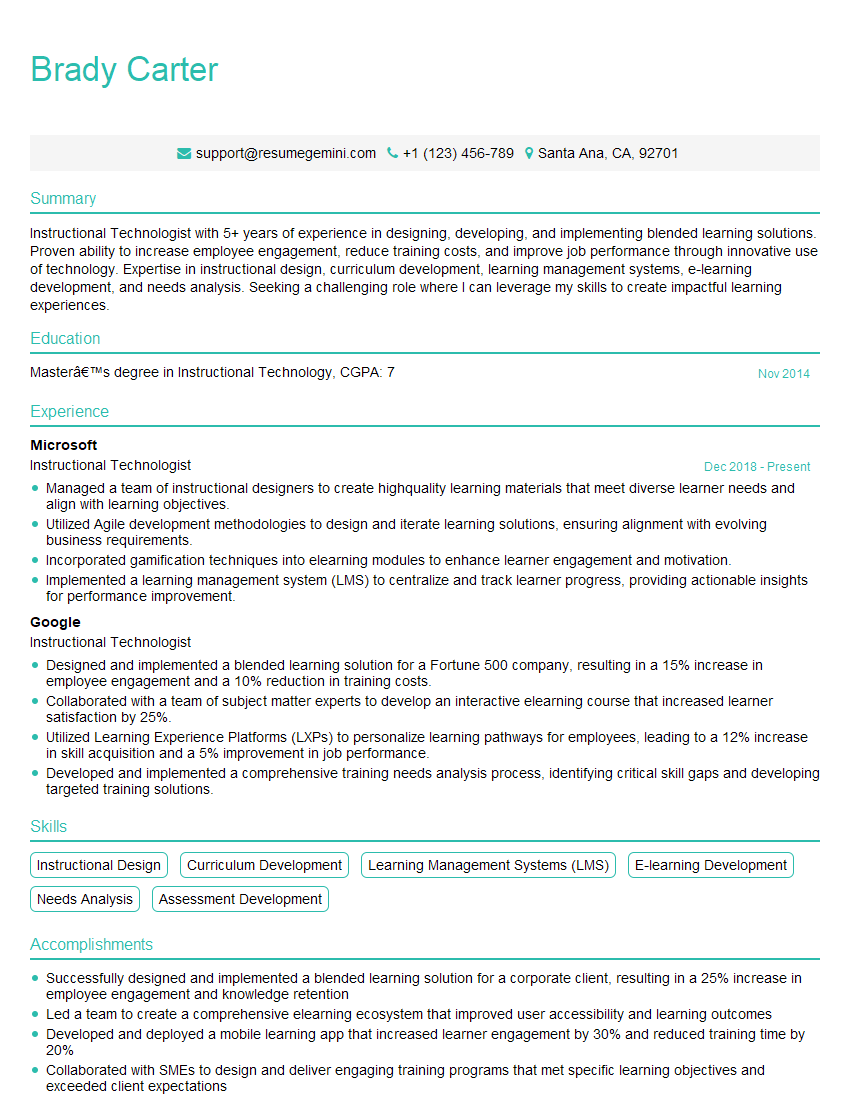

Explore more articles
Users Rating of Our Blogs
Share Your Experience
We value your feedback! Please rate our content and share your thoughts (optional).
What Readers Say About Our Blog
I Redesigned Spongebob Squarepants and his main characters of my artwork.
https://www.deviantart.com/reimaginesponge/art/Redesigned-Spongebob-characters-1223583608
IT gave me an insight and words to use and be able to think of examples
Hi, I’m Jay, we have a few potential clients that are interested in your services, thought you might be a good fit. I’d love to talk about the details, when do you have time to talk?
Best,
Jay
Founder | CEO